Kerberos
- It's a client/server based architecture
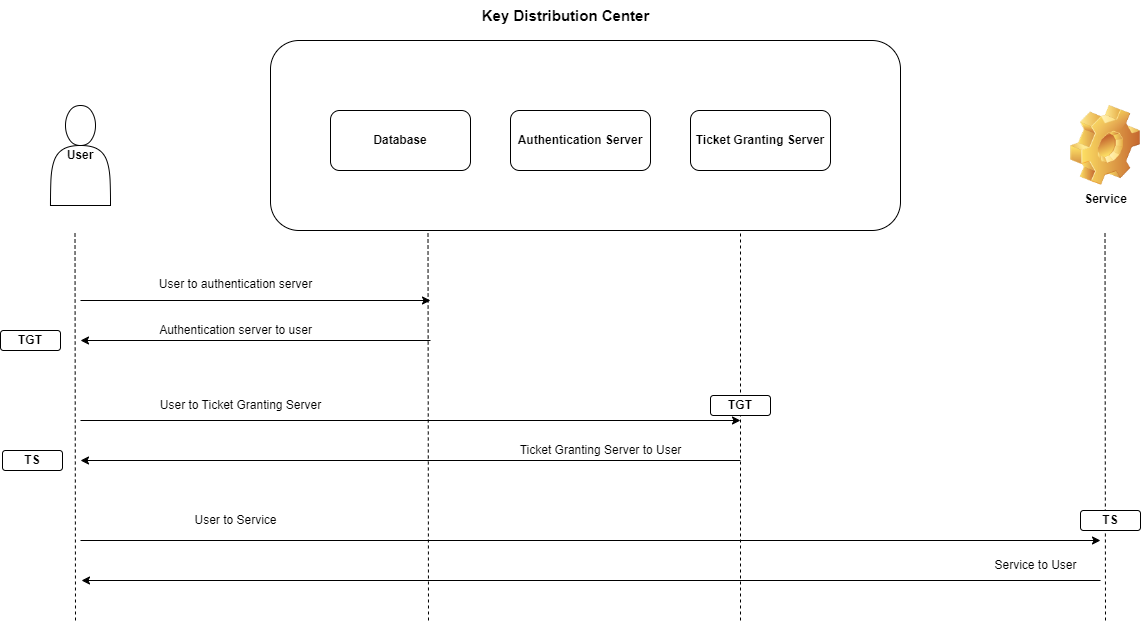
-
Principal: an identity that needs to be verified
- User Principal Names (UPN): similar to usernames in operating systems.
- Service Principal Names (SPN): is the service that the user needs to access (database, server, ...).
-
Realm:
- A realm in Kerberos refers to an authentication administrative domain.
- Principals are assigned to specific realms in order to establish boundaries and simplify administration.
-
Key Distribution Center (KDC): contains all information about principals and realm. It consists of:
- Kerberos database: it stores
- UPN and SPN
- To which realm principal belongs to
- Encryption keys
- Tickets validation duration
- Expiration date
- ...
- Authentication Server (AS):
- Delivers TGT (Ticket Granting Ticket)
- Authenticates users
- TGT is delivered if authentication is successful
- Ticket Granting Server (TGS):
- Validates TGT
- Delivers TS (Ticket Service)
- Kerberos database: it stores
-
KeyTab: file that contains all keys related to specific service
Principal parts
- Primary
<shortname>@<REALM>- Example:
bob@EXAMPLE.COM=> bob belongs to realm EXAMPLE.COM
- Instance
<shortname>/<instance>@<REALM>- Example:
username/admin@EXAMPLE.COM
- Service
<shortname>/<hostname>@<REALM>- Example:
hdfs/node1.domain.com@EXAMPLE.COM=> servicehdfsin the nodenode1.domain.com
PS: naming is case-sensitive
Trust
- One way
- bidirectional trust or full trust
Advantages
- Is Single sign on
- Password do not travel in clear over the network
- A centralized repository for all users and services credentials
Example: Access hdfs
- Authenticate using kinit service
- Sends authentication to Authentication Server
- If OK: AS sends TGT to user and kinit will store TGT in a credential cache and user is Authenticated
- Now user wants to run command
hdfs dfs -ls- Hadoop will use TGT and reach Ticket Granting Server
- TGS will grant TS (Ticket Service) and client will cache TS
- Hadoop RPC will use TS to reach the Namenode
- Client and Namenode exchange Tickets (Client ticket prove client identity and Namenode determines the identification of Namenode)
Kerberos on Hadoop
- Create KDC
- Create service principal for each service (HDFS, Yarn, ...)
- Create Encrypted Kerberos Keys (Keytabs) for each service
- Distribute keytab for service principals to each service on the cluster nodes
- Configure all services (HDFS, Yarn, Hive, ...) to rely on Kerberos
Installation
Server Side
1. Install Kerberos Admin Server: install the server and KDC
yum install krb5-workstation krb5-libs krb5-server
2. Configure Kerberos
-
Two configuration files
/etc/krb5.conf/var/kerberos/krb5kdc/kdc.conf
-
Configure the realm
sudo vi /etc/krb5.conf
[realms]
 # realm name
 HADOOP.COM = {
  # the name of KDC
  kdc = server.hostname.com
  # The admin Server
  admin_server = server.hostname.com
 }
- Configure KDC
vi /var/kerberos/krb5kdc/kdc.conf
4. Create KDC database
kdb5_util create -r HADOOP.COM -s
5. Specify the admin principals and add admin principal
- All users in realm
*/admin@HDPCLUSTER.COMwill have admin access kadmin.localutility used only on the krb server
vi /var/kerberos/krb5kdc/kadm5.acl
kadmin.local -q "addprinc root/admin"
6. Start kdc and the server
service krb5kdc start
service kadmin start
7. Test
# list if ticket is present in cache
klist

# get ticket
kinit username

# add principal
kadmin
addprinc username@REALM.COM
Client Side
1.Install
yum install krb5-workstation krb5-libs krb5-auth-dialog